
When it appears
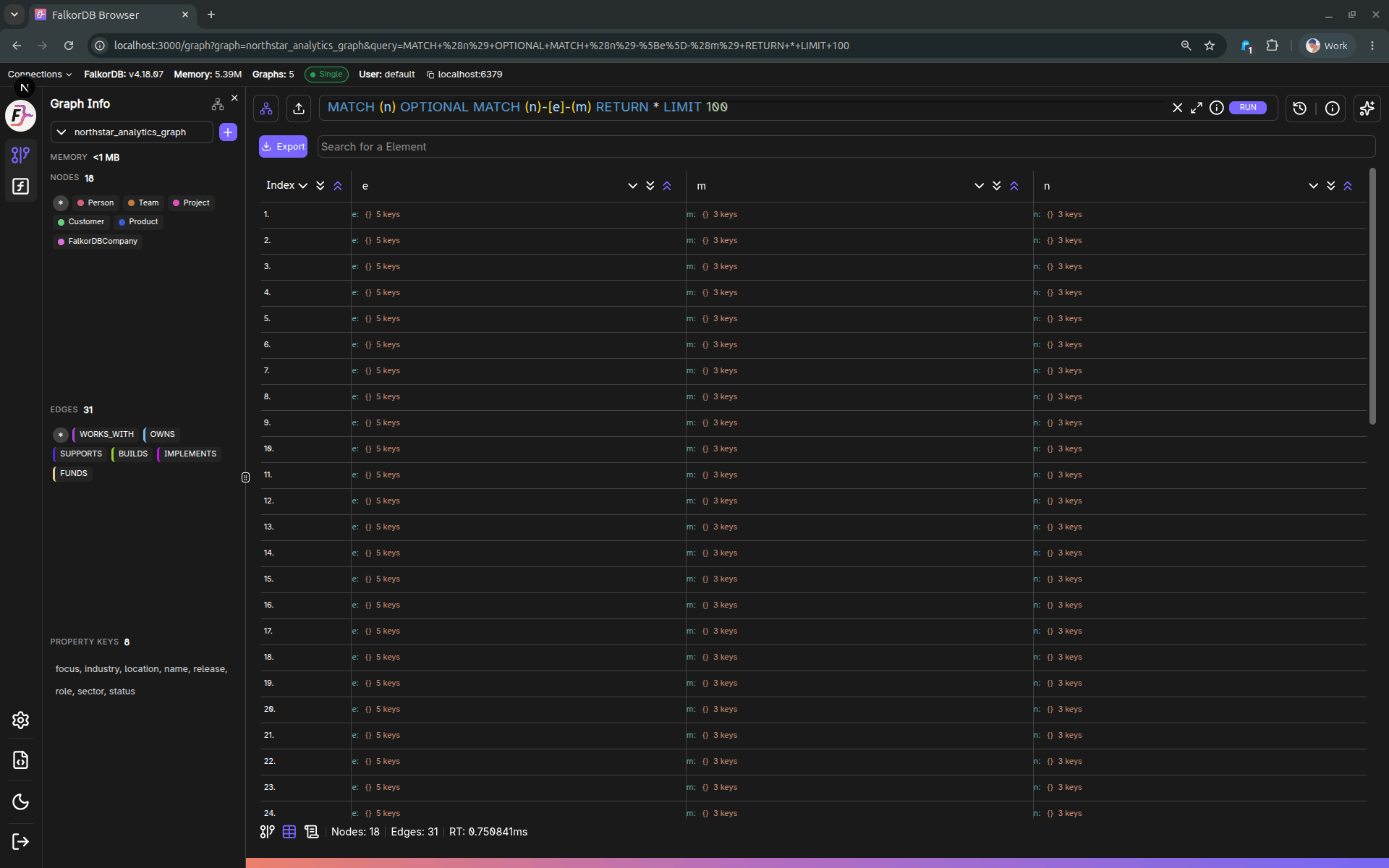
The Table tab is enabled when the current query producedgraph.Data (i.e., non-empty tabular results).
Features
- Automatic header extraction (union of keys across returned rows).
- Table UI capabilities provided by the shared Table component:
- Search
- Expand/collapse nested values (when applicable)
- Scroll position persistence within the session
Export to CSV
Click Export to download the current table results as a CSV file. Notes:- Complex values (objects) are serialized as JSON.
- The output filename includes the graph ID (e.g.,
<graph>_table_export.csv).
Frequently Asked Questions
When does the Table tab appear?
When does the Table tab appear?
The Table tab is enabled when your query returns tabular data (non-empty
graph.Data results). If the query only returns graph elements without tabular output, the tab may be disabled.How do I export query results to CSV?
How do I export query results to CSV?
Click the Export button in the Table view to download the current results as a CSV file. The filename includes the graph ID (e.g.,
mygraph_table_export.csv).How are complex or nested values displayed?
How are complex or nested values displayed?
Complex values such as objects are serialized as JSON in both the table display and the CSV export.
Can I search within the table results?
Can I search within the table results?
Yes. The Table view includes a search feature that lets you filter through the displayed rows.