> ## Documentation Index
> Fetch the complete documentation index at: https://new.docs.falkordb.com/llms.txt
> Use this file to discover all available pages before exploring further.
# Style Panel
> Customize label styles (color/size), live preview, persistence in localStorage, and cancel/save behavior.
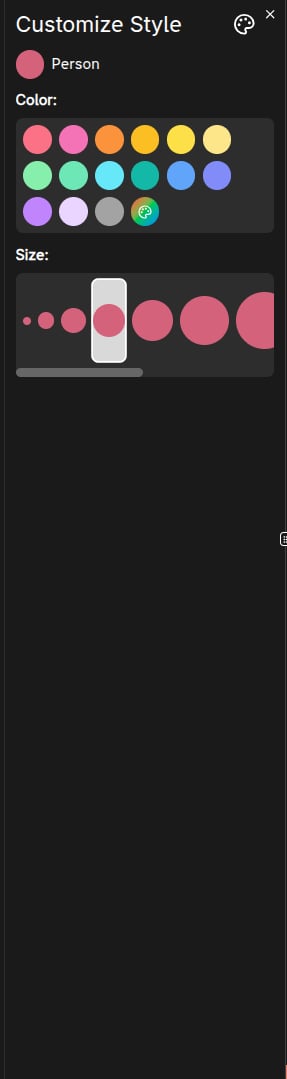
The Style panel ("Style Settings") customizes how nodes of a specific label appear in the graph.
 ## How to open
1. Open **Graph Info**.
2. Click the palette icon next to a node label.
## What you can change
* **Color**
* Preset colors
* Custom color via a red/green/blue color picker
* **Size**
* Choose from predefined size options
Changes are previewed immediately on the canvas.
## Save vs Cancel
* **Save**
* Closes the panel.
* Persists the style to browser storage (localStorage) so the label keeps the style.
* **Cancel / Close**
* Reverts to the original style values.
## Tutorial note
During the tutorial, saving style changes is intentionally prevented.
## Frequently Asked Questions
Open the **Graph Info** panel, then click the **palette icon** next to the node label you want to customize.
No. You must click **Save** to persist changes to localStorage. Clicking **Cancel** or closing the panel reverts to the original style.
Yes. Besides preset colors, you can choose a **custom color** using the red/green/blue color picker.
No. Styles are stored in your browser's **localStorage** and only apply to your session. Other users will see their own style settings.
## How to open
1. Open **Graph Info**.
2. Click the palette icon next to a node label.
## What you can change
* **Color**
* Preset colors
* Custom color via a red/green/blue color picker
* **Size**
* Choose from predefined size options
Changes are previewed immediately on the canvas.
## Save vs Cancel
* **Save**
* Closes the panel.
* Persists the style to browser storage (localStorage) so the label keeps the style.
* **Cancel / Close**
* Reverts to the original style values.
## Tutorial note
During the tutorial, saving style changes is intentionally prevented.
## Frequently Asked Questions
Open the **Graph Info** panel, then click the **palette icon** next to the node label you want to customize.
No. You must click **Save** to persist changes to localStorage. Clicking **Cancel** or closing the panel reverts to the original style.
Yes. Besides preset colors, you can choose a **custom color** using the red/green/blue color picker.
No. Styles are stored in your browser's **localStorage** and only apply to your session. Other users will see their own style settings.