> ## Documentation Index
> Fetch the complete documentation index at: https://new.docs.falkordb.com/llms.txt
> Use this file to discover all available pages before exploring further.
# Query History
> Persistent local query history: open dialog, search/filter by graph, view metadata, delete queries.
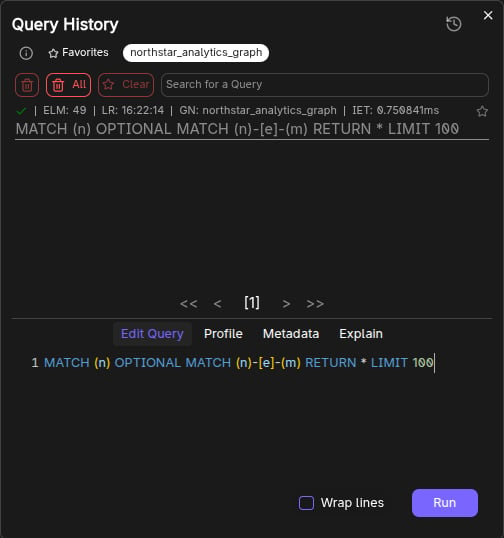
Query History stores previously executed queries in the browser (localStorage) and exposes a dialog to browse them.
 ## Opening Query History
Click the history button (clock icon) in the selector bar.
If there are no saved queries, the button is disabled.
## What you can do
Inside the Query History dialog:
* **Search** previous queries.
* **Filter by graph name** (toggle one or more graphs).
* **Select a query** to load it into the history editor.
* **View per-query tabs**:
* Edit Query
* Profile
* Metadata
* Explain
## Deleting history
The dialog supports:
* Delete selected queries (supports multi-select via Ctrl + right-click)
* Delete all queries
Persistence notes:
* Stored under localStorage key: `query history`.
## Frequently Asked Questions
Query history is stored in your browser's **localStorage** under the key `query history`. It persists across sessions but is local to your browser.
Click the **history button** (clock icon) in the selector bar above the query editor. The button is disabled if no queries have been saved yet.
Yes. In the Query History dialog, use **Ctrl + right-click** to multi-select queries, then delete the selected ones. You can also delete all queries at once.
Yes. The dialog includes a **filter by graph name** option that lets you toggle one or more graphs to narrow down the displayed queries.
## Opening Query History
Click the history button (clock icon) in the selector bar.
If there are no saved queries, the button is disabled.
## What you can do
Inside the Query History dialog:
* **Search** previous queries.
* **Filter by graph name** (toggle one or more graphs).
* **Select a query** to load it into the history editor.
* **View per-query tabs**:
* Edit Query
* Profile
* Metadata
* Explain
## Deleting history
The dialog supports:
* Delete selected queries (supports multi-select via Ctrl + right-click)
* Delete all queries
Persistence notes:
* Stored under localStorage key: `query history`.
## Frequently Asked Questions
Query history is stored in your browser's **localStorage** under the key `query history`. It persists across sessions but is local to your browser.
Click the **history button** (clock icon) in the selector bar above the query editor. The button is disabled if no queries have been saved yet.
Yes. In the Query History dialog, use **Ctrl + right-click** to multi-select queries, then delete the selected ones. You can also delete all queries at once.
Yes. The dialog includes a **filter by graph name** option that lets you toggle one or more graphs to narrow down the displayed queries.