> ## Documentation Index
> Fetch the complete documentation index at: https://new.docs.falkordb.com/llms.txt
> Use this file to discover all available pages before exploring further.
# Graph Page (Layout)
> How the main Graphs workspace is laid out: selector bar, query editor, results area, side panel that can be resized.
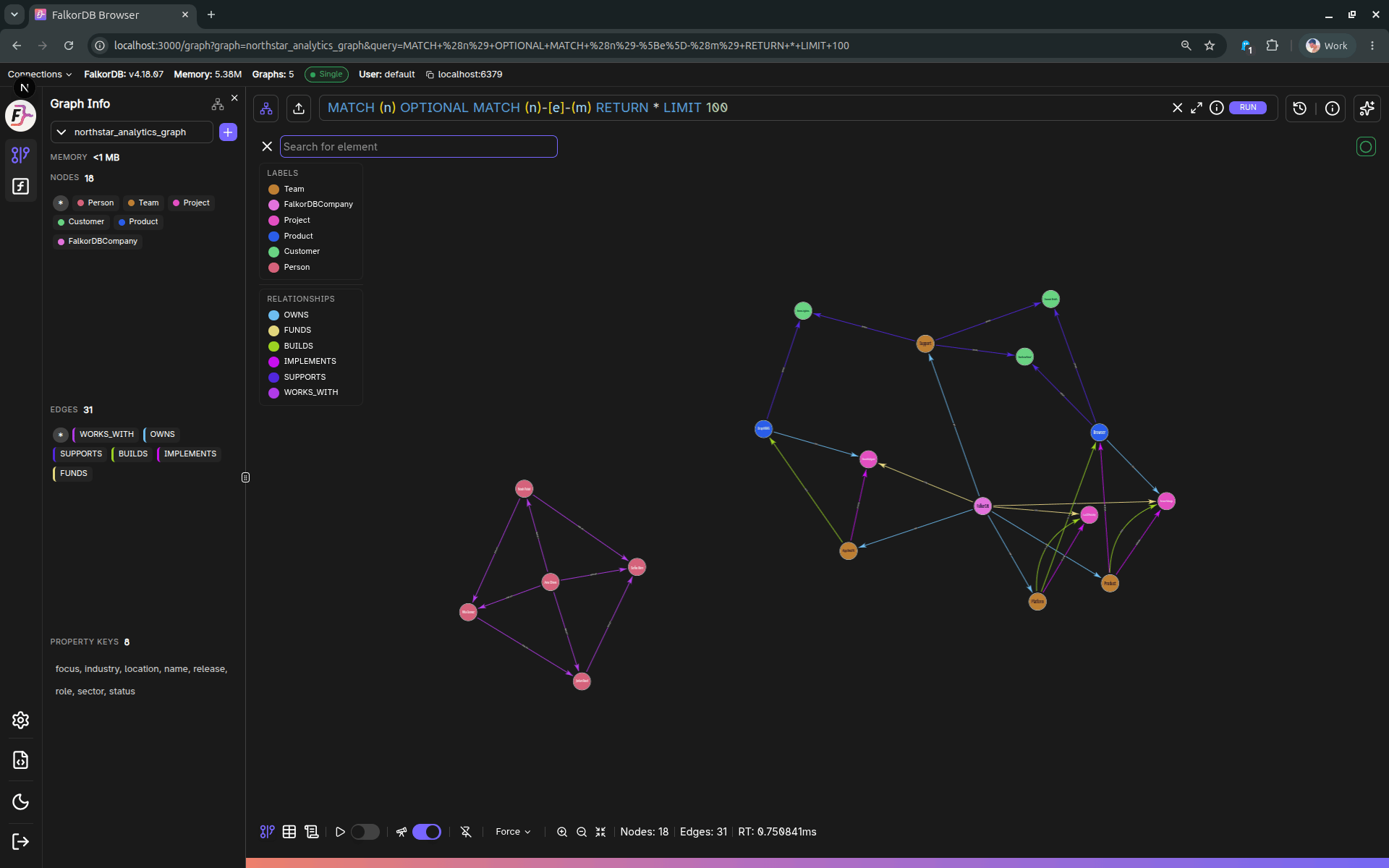
The Graph page (`/graph`) is the primary workspace for querying and visualizing data.
 ## High-level layout
The page is composed of:
1. **Left sidebar** (navigation, theme, graph info/chat toggles)
2. **Top selector bar**
* Graph selector (choose the active graph)
* Query editor (Monaco-based) with Run button
* Query history button + editor maximize button
3. **Main results area**
* **Graph** tab (visual canvas)
* **Table** tab (tabular results)
* **Metadata** tab (Explain/Profile/Metadata)
4. **Right side panel** (can be resized, context-driven)
* **Data panel** (inspect/edit selected node/edge)
* **Add panel** (create nodes/edges)
* **Chat panel** (natural-language querying)
## Right-hand panel resize behavior
The right panel expands/collapses based on what you’re doing:
* Selecting a node/edge typically opens **Data**.
* Starting “Add node / Add edge” opens **Add**.
* Toggling Chat opens **Chat** and clears selection.
## Graph info refresh
Graph info (labels, relationship types, property keys, memory usage) is periodically refreshed based on the configured refresh interval.
## Frequently Asked Questions
The page has a **left sidebar** for navigation, a **top selector bar** with the graph selector and query editor, a **main results area** with Graph/Table/Metadata tabs, and a **right side panel** for data inspection, adding elements, or chat.
Yes. The right panel expands and collapses based on context (selecting an element opens Data, creating elements opens Add, toggling Chat opens the Chat panel) and can be manually resized.
Graph Info refreshes periodically based on the **refresh interval** configured in Settings → Browser Settings → Graph Info.
The three tabs are **Graph** (visual canvas), **Table** (tabular rows/columns), and **Metadata** (Explain/Profile/Metadata output).
## High-level layout
The page is composed of:
1. **Left sidebar** (navigation, theme, graph info/chat toggles)
2. **Top selector bar**
* Graph selector (choose the active graph)
* Query editor (Monaco-based) with Run button
* Query history button + editor maximize button
3. **Main results area**
* **Graph** tab (visual canvas)
* **Table** tab (tabular results)
* **Metadata** tab (Explain/Profile/Metadata)
4. **Right side panel** (can be resized, context-driven)
* **Data panel** (inspect/edit selected node/edge)
* **Add panel** (create nodes/edges)
* **Chat panel** (natural-language querying)
## Right-hand panel resize behavior
The right panel expands/collapses based on what you’re doing:
* Selecting a node/edge typically opens **Data**.
* Starting “Add node / Add edge” opens **Add**.
* Toggling Chat opens **Chat** and clears selection.
## Graph info refresh
Graph info (labels, relationship types, property keys, memory usage) is periodically refreshed based on the configured refresh interval.
## Frequently Asked Questions
The page has a **left sidebar** for navigation, a **top selector bar** with the graph selector and query editor, a **main results area** with Graph/Table/Metadata tabs, and a **right side panel** for data inspection, adding elements, or chat.
Yes. The right panel expands and collapses based on context (selecting an element opens Data, creating elements opens Add, toggling Chat opens the Chat panel) and can be manually resized.
Graph Info refreshes periodically based on the **refresh interval** configured in Settings → Browser Settings → Graph Info.
The three tabs are **Graph** (visual canvas), **Table** (tabular rows/columns), and **Metadata** (Explain/Profile/Metadata output).