> ## Documentation Index
> Fetch the complete documentation index at: https://new.docs.falkordb.com/llms.txt
> Use this file to discover all available pages before exploring further.
# Graph Info Panel
> Graph statistics (counts, memory), labels, edge types, property keys, and quick exploration queries.
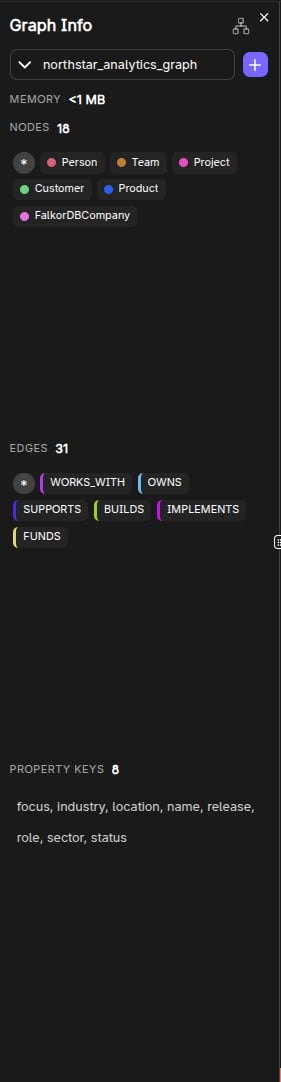
The Graph Info panel provides quick, clickable insights into the selected graph’s structure.
 ## What it shows
* **Graph name**
* **Memory usage** (optional; can be toggled via settings)
* **Node count** and **edge count**
* **Node labels**
* **Edge (relationship) types**
* **Property keys**
## Click-to-explore behavior
The panel is designed for exploration:
* Clicking a **label** runs `MATCH (n:Label) RETURN n`.
* Clicking an **edge type** runs `MATCH p=()-[:TYPE]-() RETURN p`.
* Clicking a **property key** runs a query that finds nodes/edges where that key exists.
It also provides “\*” shortcuts:
* **All nodes** (`MATCH (n) RETURN n`)
* **All edges** (`MATCH p=()-[]-() RETURN p`)
## Style customization entrypoint
Next to each label, a palette button opens the **Style Settings** panel for that label.
## Frequently Asked Questions
Click a **label name** in the Graph Info panel. This automatically runs `MATCH (n:Label) RETURN n` and displays the results on the canvas.
Yes. Click an **edge type** in the Graph Info panel to run `MATCH p=()-[:TYPE]-() RETURN p` and visualize all relationships of that type.
It shows the current **memory utilization** of the selected graph in MB. This can be toggled on/off in Browser Settings.
Click the **palette icon** next to a label in the Graph Info panel to open the Style Settings panel where you can change color and size.
## What it shows
* **Graph name**
* **Memory usage** (optional; can be toggled via settings)
* **Node count** and **edge count**
* **Node labels**
* **Edge (relationship) types**
* **Property keys**
## Click-to-explore behavior
The panel is designed for exploration:
* Clicking a **label** runs `MATCH (n:Label) RETURN n`.
* Clicking an **edge type** runs `MATCH p=()-[:TYPE]-() RETURN p`.
* Clicking a **property key** runs a query that finds nodes/edges where that key exists.
It also provides “\*” shortcuts:
* **All nodes** (`MATCH (n) RETURN n`)
* **All edges** (`MATCH p=()-[]-() RETURN p`)
## Style customization entrypoint
Next to each label, a palette button opens the **Style Settings** panel for that label.
## Frequently Asked Questions
Click a **label name** in the Graph Info panel. This automatically runs `MATCH (n:Label) RETURN n` and displays the results on the canvas.
Yes. Click an **edge type** in the Graph Info panel to run `MATCH p=()-[:TYPE]-() RETURN p` and visualize all relationships of that type.
It shows the current **memory utilization** of the selected graph in MB. This can be toggled on/off in Browser Settings.
Click the **palette icon** next to a label in the Graph Info panel to open the Style Settings panel where you can change color and size.