> ## Documentation Index
> Fetch the complete documentation index at: https://new.docs.falkordb.com/llms.txt
> Use this file to discover all available pages before exploring further.
# Data / Property Panel
> Inspect and edit node/edge details: ID, labels/relationship type, and property table editing.
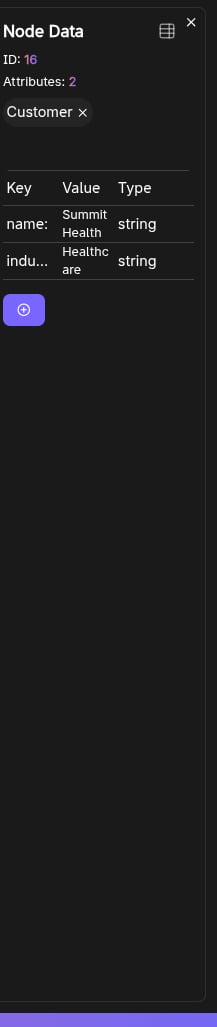
The Data panel opens when you select a node or edge in the graph. It’s used to inspect properties and perform edit operations.
 ## What it shows
For the selected element:
* **ID**
* **Attributes count**
* **Labels** (nodes) or **Relationship type** (edges)
* A **properties table** (key/value) for viewing and editing attributes
## Node label management
For nodes (and when the user role is not Read-Only):
* **Add Label**
* **Remove Label** (except the “default” empty label)
Label changes are immediately reflected in:
* The in-app graph model
* The visible canvas node styling
* The graph info panel counts/listing
## Editing properties
Properties are managed via the embedded table component. Typical operations include:
* Editing existing values
* Adding/removing properties
(Exact editing options depend on the table component implementation.)
## Keyboard shortcut
* `Esc` closes the Data panel.
## Frequently Asked Questions
**Select a node or edge** on the graph canvas by clicking it. The Data panel opens automatically to show the element's properties.
Yes. For nodes (when you are not a Read-Only user), you can **Add Label** or **Remove Label** directly from the Data panel. Changes are reflected immediately on the canvas.
Press **Esc** on your keyboard or click elsewhere on the canvas to deselect the element.
It displays the element's **ID**, **attributes count**, **labels** (for nodes) or **relationship type** (for edges), and a **properties table** with all key/value pairs.
## What it shows
For the selected element:
* **ID**
* **Attributes count**
* **Labels** (nodes) or **Relationship type** (edges)
* A **properties table** (key/value) for viewing and editing attributes
## Node label management
For nodes (and when the user role is not Read-Only):
* **Add Label**
* **Remove Label** (except the “default” empty label)
Label changes are immediately reflected in:
* The in-app graph model
* The visible canvas node styling
* The graph info panel counts/listing
## Editing properties
Properties are managed via the embedded table component. Typical operations include:
* Editing existing values
* Adding/removing properties
(Exact editing options depend on the table component implementation.)
## Keyboard shortcut
* `Esc` closes the Data panel.
## Frequently Asked Questions
**Select a node or edge** on the graph canvas by clicking it. The Data panel opens automatically to show the element's properties.
Yes. For nodes (when you are not a Read-Only user), you can **Add Label** or **Remove Label** directly from the Data panel. Changes are reflected immediately on the canvas.
Press **Esc** on your keyboard or click elsewhere on the canvas to deselect the element.
It displays the element's **ID**, **attributes count**, **labels** (for nodes) or **relationship type** (for edges), and a **properties table** with all key/value pairs.