> ## Documentation Index
> Fetch the complete documentation index at: https://new.docs.falkordb.com/llms.txt
> Use this file to discover all available pages before exploring further.
# Browser
> FalkorDB Browser web UI for visualizing graphs, running Cypher queries, exploring data models, managing nodes and relationships, with query history and API documentation.
FalkorDB's Browser provides a web UI for exploring, querying, and managing FalkorDB graphs. It allows developers to interact with graphs loaded to FalkorDB, explore how specific queries behave, and review the current data model. FalkorDB Browser integrates within the main FalkorDB Docker container and through the Cloud service.
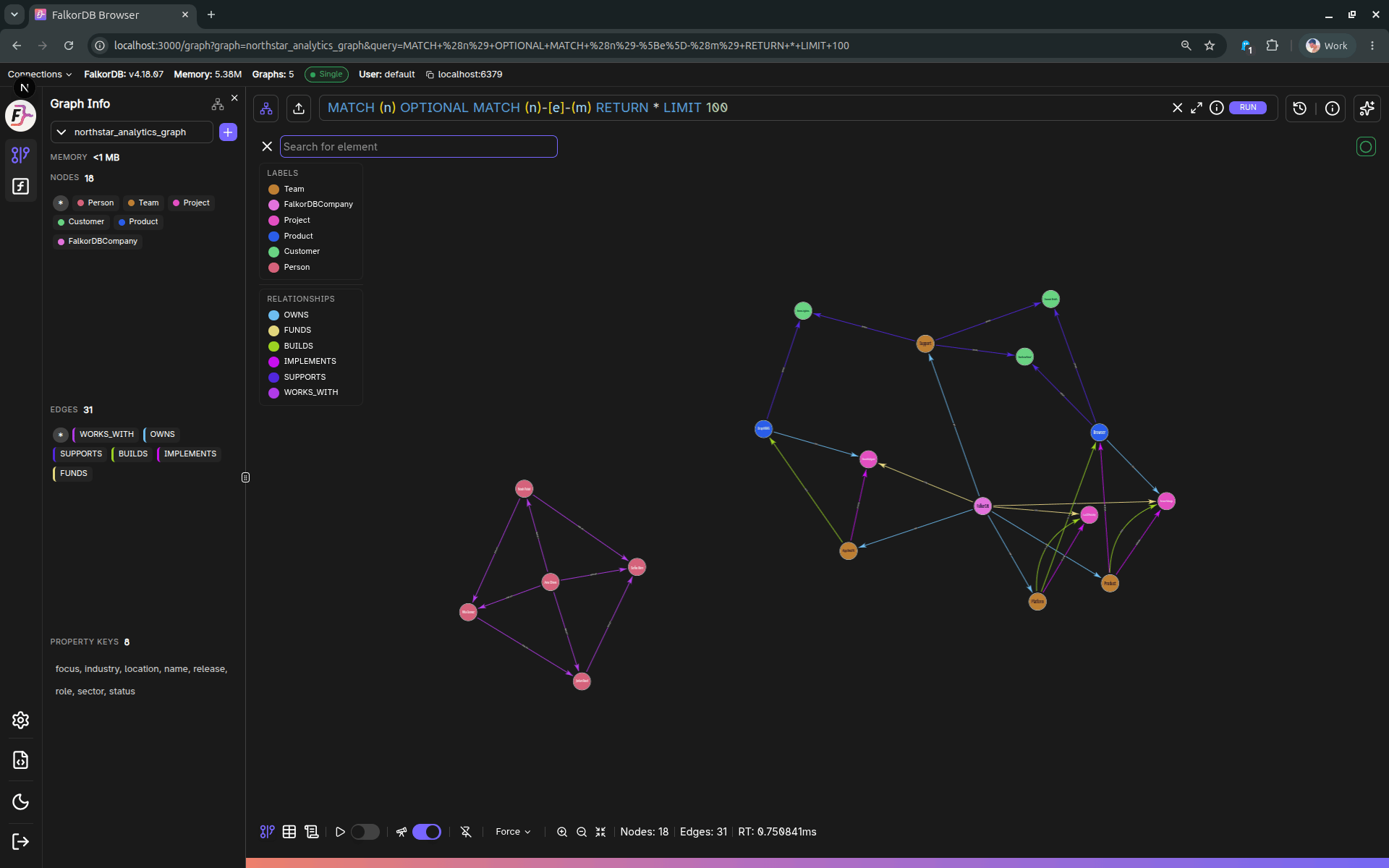 The screenshots in this section use a realistic demo graph so the UI reads like a working product environment instead of a toy fixture.
***
## UI elements
For detailed documentation of each major UI element (login, settings, graph canvas, panels, query editor/history, table view, etc.), see:
* [UI Elements](/browser/ui)
* [Upload Data dialog](/browser/ui/upload-data)
* [UDF Libraries page](/browser/ui/udf-libraries)
## Canvas Component
FalkorDB Canvas is the standalone web component that powers the graph visualization in FalkorDB Browser. It can also be used independently in any web application.
* [Canvas](/browser/canvas)
***
## Main Features
Use these focused pages for detailed coverage without duplication:
| Area | Documentation |
| :--------------------------------------------------------------- | :-------------------------------------------------- |
| Graph workspace (canvas, panels, querying, history, and results) | [UI Elements](/browser/ui) |
| Graph lifecycle actions (create/delete/duplicate/export/upload) | [Graphs Manager](/browser/ui/graph-management) |
| Built-in REST API docs (`/docs`) | [API Docs (Swagger)](/browser/ui/api-documentation) |
| Authentication and role-based permissions | [Roles & Access](/browser/ui/auth-access-control) |
| Upload workflows | [Upload Data dialog](/browser/ui/upload-data) |
| UDF library workflows | [UDF Libraries page](/browser/ui/udf-libraries) |
## Frequently Asked Questions
FalkorDB Browser is a web UI accessible at **port 3000** by default. It is included in the main FalkorDB Docker container and is also available through the Cloud service.
The Browser supports `falkor://`, `falkors://`, `redis://`, and `rediss://` URL formats for connecting to a FalkorDB server.
Yes. Navigate to graph management, select a graph, and click **Export Data** to download a `.dump` file via the `/api/graph/:graph/export` endpoint.
FalkorDB Browser uses **Cypher** as its query language. The built-in Monaco editor provides keyword autocompletion and syntax highlighting.
Yes. A built-in Swagger UI is available at `/docs` which loads the OpenAPI spec from `/api/swagger` and supports interactive 'Try it out' requests.
The screenshots in this section use a realistic demo graph so the UI reads like a working product environment instead of a toy fixture.
***
## UI elements
For detailed documentation of each major UI element (login, settings, graph canvas, panels, query editor/history, table view, etc.), see:
* [UI Elements](/browser/ui)
* [Upload Data dialog](/browser/ui/upload-data)
* [UDF Libraries page](/browser/ui/udf-libraries)
## Canvas Component
FalkorDB Canvas is the standalone web component that powers the graph visualization in FalkorDB Browser. It can also be used independently in any web application.
* [Canvas](/browser/canvas)
***
## Main Features
Use these focused pages for detailed coverage without duplication:
| Area | Documentation |
| :--------------------------------------------------------------- | :-------------------------------------------------- |
| Graph workspace (canvas, panels, querying, history, and results) | [UI Elements](/browser/ui) |
| Graph lifecycle actions (create/delete/duplicate/export/upload) | [Graphs Manager](/browser/ui/graph-management) |
| Built-in REST API docs (`/docs`) | [API Docs (Swagger)](/browser/ui/api-documentation) |
| Authentication and role-based permissions | [Roles & Access](/browser/ui/auth-access-control) |
| Upload workflows | [Upload Data dialog](/browser/ui/upload-data) |
| UDF library workflows | [UDF Libraries page](/browser/ui/udf-libraries) |
## Frequently Asked Questions
FalkorDB Browser is a web UI accessible at **port 3000** by default. It is included in the main FalkorDB Docker container and is also available through the Cloud service.
The Browser supports `falkor://`, `falkors://`, `redis://`, and `rediss://` URL formats for connecting to a FalkorDB server.
Yes. Navigate to graph management, select a graph, and click **Export Data** to download a `.dump` file via the `/api/graph/:graph/export` endpoint.
FalkorDB Browser uses **Cypher** as its query language. The built-in Monaco editor provides keyword autocompletion and syntax highlighting.
Yes. A built-in Swagger UI is available at `/docs` which loads the OpenAPI spec from `/api/swagger` and supports interactive 'Try it out' requests.